
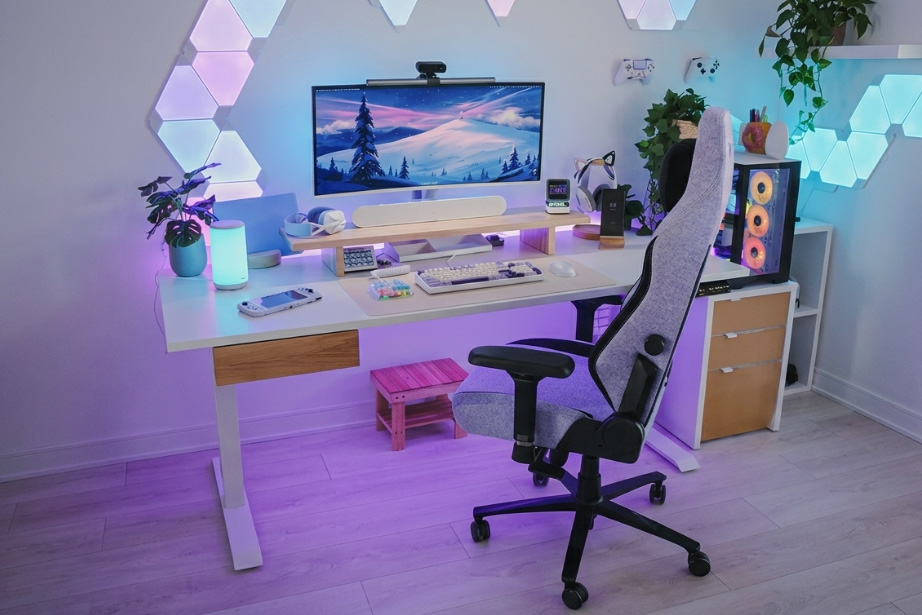
The Desky Dual Melamine Sit Stand Desk became my daily driver six months ago, and this review covers what actually holds up after the honeymoon period ends.
Most sit-stand desks let taller users down on three counts: the maximum height falls short, the frame wobbles at full extension, or the cable situation becomes a second job by month two. The Desky Dual avoids all three, and after daily use from a 6’3″ home office setup, it has not given me a single reason to second-guess it.
TechRadar reviewed the Desky Dual and described it as “an affordable, voice-controlled workplace essential” [3], a verdict that holds up under extended use.
Does the Height Range Actually Cover Tall People?
The Desky Dual Sit Stand Desk adjusts from 60cm to 125cm, covering users up to around 210cm without compromise. At maximum height, a 6’3″ frame reaches a neutral standing position with elbows close to 90 degrees and no forward lean required. Most desks at this price point cap out around 120cm, leaving taller users in a slightly hunched posture that defeats the purpose of standing in the first place. [1]
The 5cm difference between 120cm and 125cm sounds marginal. After four hours standing, your spine disagrees.
Desky Dual Specs: What Each Number Means for a Tall User
| Spec | Detail | Why It Matters If You’re Tall |
| Height range | 60cm–125cm | Reaches neutral elbow height for frames up to ~210cm; most competitors stop at around 120cm |
| Weight capacity | 140kg | Carries dual monitors, a full PC tower, and peripherals without frame stress |
| Motor speed | 36mm/s | Transitions feel instant; no friction when switching positions multiple times a day |
| Noise level | <40dB | Silent enough for video calls at any height setting |
| Height presets | 4 saved positions | One-touch recall of your exact sitting and standing heights, no re-dialling each session |
| Desktop widths | 1200mm–2000mm | Wide enough for multi-monitor setups at the higher ergonomic positions tall users need |
| Cable management | Built-in channels + up to 8-outlet power board | Cables move with the desk; nothing snags or pulls when adjusting height |
| Smart control | Siri, Google Assistant + mobile app | Hands-free height adjustment; sit/stand reminders counter the habit of staying seated too long |
| Frame warranty | 10 years | Long-term confidence for a primary workstation you rely on daily |
| Motor warranty | 5 years | Motors covered through years of multiple daily height transitions |
Six Months In: What Still Impresses (and One Honest Trade-Off)
The heavy-duty steel frame handles two 27-inch monitors, a full desktop tower, and peripherals without any sway at maximum height. The dual motor system runs at under 40dB and raises the desk at 36mm per second, fast enough to feel instant rather than mechanical. [2]
The frame has not shifted, loosened, or developed any rattles after six months of multiple daily height transitions. The 140kg weight capacity gives genuine headroom above any realistic home office load.
The melamine desktop surface does show wear with sustained heavy keyboard use over time. For anyone prioritising long-term surface durability, Desky’s hardwood option is their bestseller for good reason. It holds up considerably better and sits at a competitive price compared to other hardwood desks on the Australian market.
The Desky Dual as a platform is the same either way: desktop material is a preference decision, not a structural one.
The Smart Features That Actually Changed the Routine
The Desky Dual connects to a dedicated mobile app and integrates with Siri and Google Assistant, so height adjustments happen without touching a button. Four saved presets make transitions a two-second habit rather than a deliberate decision, and the sit/stand reminder feature monitors how long you stay in each position and prompts you to switch before the session drags.
That nudge compounds over time, particularly for tall users who carry more lower back strain from prolonged sitting.
Usage tracking in the app surfaces patterns most people would rather not see. The data is blunt about how little time you actually spend standing. Voice control via Siri rounds it out: adjusting desk height mid-call or while reading is a genuine convenience, not a gimmick.
Cable Management That Works Without Any Add-Ons
The Desky Dual integrates cable management directly into the desk frame, not as a bolt-on tray or afterthought. Purpose-built under-desk cable channels route everything through a clean path that moves seamlessly with the desk as it raises and lowers. No cable snags, no monitor tugging, no re-routing required after a height change.
Desky’s optional integrated power board adds up to 8 outlets mounted under the desktop, eliminating the need for a floor-level power strip in most setups. A home office running a PC, dual monitors, a USB hub, and audio gear can run floor-to-desk on a single clean cable route. The result is a desk that looks deliberate rather than managed, which matters if your setup is on camera.
CNN Underscored independently included Desky’s cable management system in their roundup of the best cord organisation solutions [4], which reflects the same conclusion you reach after living with the setup.
How It Compares to UpDown and FlexiSpot
UpDown delivers solid core performance and is a capable alternative in the Australian market, but cable management requires third-party solutions, and the height ceiling falls slightly short for users above 6’2″.
FlexiSpot offers a wide model range and competes on price, but the Desky Dual’s app experience and Siri integration are noticeably more polished, and neither competitor includes cable routing in the frame as standard.
The Desky Dual also carries a 10-year frame warranty and 5-year motor warranty, with showrooms across Sydney, Melbourne, Brisbane, and Adelaide. That local support structure counts when a desk is a five-year purchase.
Who the Desky Dual Is Built For
The Desky Dual Sit Stand Desk suits tall home-office users who want genuine ergonomic reach, a stable multi-monitor platform, and a clean setup without a separate cable project. It works equally well for content creators running demanding gear, remote workers in shared spaces needing quiet motor operation, and anyone who has dealt with a desk that wobbles only at the height they actually need.
The melamine version covers the full ergonomic range for taller bodies and does everything required at the price point. The hardwood upgrade is worth it for long-term surface durability. It’s the bestseller for a reason.
Explore the Desky Dual Sit Stand Desk at https://desky.com.au/products/dual-melamine-sit-stand-desk to configure the right size and finish for your setup.
FAQs
Is the Desky Dual a good standing desk for tall people?
The 60cm–125cm height range accommodates users up to around 210cm and delivers a neutral ergonomic standing position for anyone around 6’3″ without additional risers or adjustments. The dual-motor system keeps the frame stable at maximum height, where most competitors fall short.
How stable is the Desky Dual at full height under a heavy load?
The steel frame supports up to 140kg and holds firm through six months of daily use under a dual-monitor, full-desktop setup with no flex or mechanical wear. The dual motors evenly distribute the load, a structural advantage over single-motor alternatives.
Does the Desky Dual app work reliably for daily use?
The app pairs consistently, stores height presets, and delivers sit/stand reminders that measurably shift sedentary habits. Siri integration allows hands-free adjustment, which is useful during a call or when you are focused on screen content.
How does the Desky Dual compare to UpDown and FlexiSpot for tall users?
The Desky Dual reaches a higher maximum height than most UpDown and FlexiSpot models, includes built-in cable management as standard, and offers a more complete smart desk experience. For Australian buyers, the local warranty and showroom network add practical value.
Is the melamine or hardwood desktop the better choice?
The melamine and hardwood options both perform well in daily use, but the melamine surface shows wear with heavy keyboard use over time. The Desky Dual Hardwood is the bestselling option and holds up better across years of daily use. For a permanent home office setup, the hardwood upgrade is a worthwhile consideration.
The Bottom Line
The Desky Dual Sit Stand Desk delivers what tall users actually need from a sit-stand desk: a height range that meets ergonomic requirements, a frame that stays stable under real loads, smart features that build genuine habits, and cable management that works without a separate purchase. Six months in, nothing has degraded.
UpDown and FlexiSpot are capable competitors at similar price points, but neither combines built-in cable routing, Siri-connected height control, and a 125cm ceiling in the same package. For tall home-office users in Australia, the Desky Dual is the practical starting point in 2026.






Comments are closed.